Starts free · New users get AI video generation credits to try
Add seconds to any clip. Stay in Final Cut Pro.
Shot cut off too soon? Need handles for a dissolve? Extend the clip on your timeline with cloud AI video, and keep cutting in Final Cut Pro.
Three steps to get started
Extender is a macOS Workflow Extension for Final Cut Pro. Download the DMG, then follow these steps so the panel shows up in Final Cut Pro.
- 01Open the DMG and drag Extender to Applications
Double-click the downloaded DMG, then drag the Extender app into the Applications folder. Eject the disk image when you are done.
- 02Launch Extender once
Open Extender from Applications. A short alert confirms the workflow extension is loaded. Close it — that one launch is what registers the plugin.
- 03Open the panel in Final Cut Pro
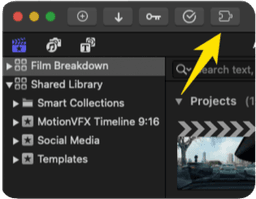
In Final Cut Pro, go to Window → Extensions → Extender. The Generative Extend panel is ready to use.


The generative feature Final Cut Pro left behind
Premiere Pro already has Generative Extend. CapCut has an AI video extender. Final Cut Pro still leaves a blank spot on the timeline for that job.
Select a shot, pull the edge, and get new frames that continue from your footage. Built for the "I need one more second" edit, not a full AI movie.
It runs as a Workflow Extension. Generated media lands back on your timeline, so you never leave the app for a browser round-trip.
Grab a credit pack and spend credits when you generate. Early access uses credit packs instead of a monthly plan.
Stretch the clip you already have
Stay inside Final Cut Pro
Buy credits, spend when you extend
How Generative Extend works in FCP
Same muscle memory as trimming. Select the clip, pull the edge past the media end, wait for new frames. Those frames match what you shot and sit on the timeline like normal media.
Pick the clip that came up short A hold that dies early, a pan that needs two more beats, a cut that wants handles.
Extend from the edge Pull past the last frame. Cloud AI continues the motion from your existing footage.
Keep cutting The result drops onto the timeline. Scrub it, trim it, move on.
Questions editors ask before they download
Clip cut off too soon? Extend it.
Download FCP Extender, open Final Cut Pro, then give that shot a few more seconds to work with.